


Spam Calls Blocker for Android
4.4580.00 Reviews
App Specs
- Version
- 2.6.0
- Updated On
- License
- Free
- Downloads
- 100,000+
- Developer
- AI Phone Call
- Categories
- Communication
- Platform
- Android
Screenshots

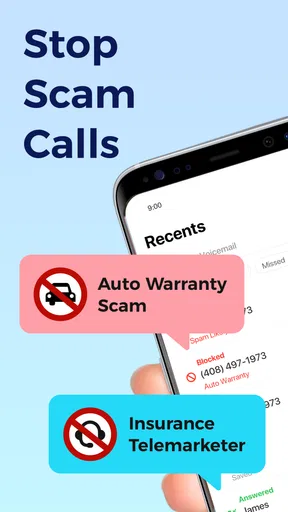

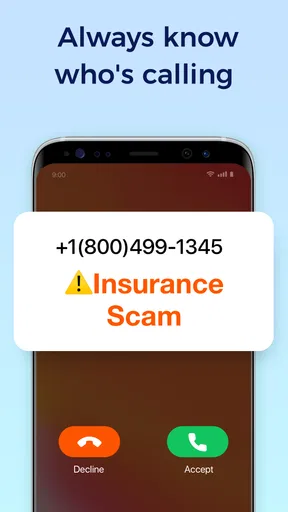
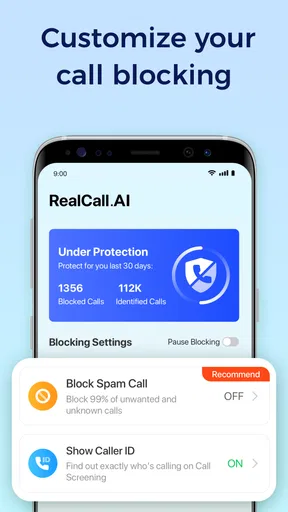
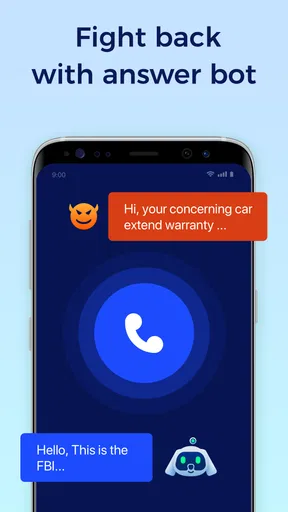
 Analysis by AppCompare
Before installing a call blocker, I’d decide what I actually need it to do: cut down interruptions, help me judge unfamiliar numbers, or give me finer control over who can reach me. RealCall.AI: Spam Call Blocker is aimed at that everyday problem, but a useful way to assess it is to separate its call-protection tools from the practical questions of cost, setup, and how much control I want to hand over to an app.
What free access means here
RealCall.AI is a free communication app from AI Phone Call. It also offers in-app purchases, with listed item prices ranging from $3.99 to $59.99. That gives me a clear starting point: I can consider the app without an upfront purchase, while paid options are part of the product too. I would check the purchase screen carefully before choosing anything, rather than assuming a particular feature or level of protection is included in a paid item.
The app is rated for Everyone, and its current version is 2.5.5, with Android 7.0 as the minimum operating system requirement. Those details help with basic suitability, but they do not tell me whether it will suit every phone or every caller pattern. If you are deciding whether to spend money, first try the free access and see whether its call handling fits your routine. I would pay only if the specific paid option solves a problem I have actually encountered.
What protection is useful for in daily life
The value of a call blocker is not just the number of interruptions it prevents. It can also reduce the small decisions that build up during a busy day: whether to answer an unknown number, whether to stop what I am doing to check it, and whether to call back after missing it. RealCall.AI’s focus on identifying and blocking suspected spam makes it relevant to people who receive enough unfamiliar calls that this repeated judgement becomes a nuisance.
Imagine I am expecting a delivery or a callback from a clinic, but my phone has also been ringing with sales calls. Blocking every unknown caller would be risky, because the important call might come from a number I have not saved. A more measured workflow is to keep essential contacts current, use the app’s call-protection tools to handle suspected spam, and look at any call details it provides before deciding whether to return an unfamiliar call. That way, protection supports my judgement instead of replacing it.
There is a trade-off here that is easy to overlook: aggressive filtering is convenient until a legitimate caller is misidentified or blocked. I would pay attention during the first stretch of use, especially if I rely on calls for work, appointments, or family matters. If a call I need does not come through, I would review the app’s settings and any available call record, then adjust how I use it rather than assuming that every unknown number is unwanted.
How it compares with the usual alternatives
Compared with relying only on a phone’s built-in call controls, a dedicated blocker is appealing when I want a focused tool for suspected spam rather than a simple choice to silence or reject calls. Built-in options may be enough if I rarely get unwanted calls or only need to block a few known numbers. RealCall.AI is more relevant when identifying unfamiliar callers and reducing repeated interruptions are the main goals.
Worth Reading Before You Choose

EA SPORTS FC Mobile 26 Is a Bigger Football Game, but It Takes Time

Flipboard Shows What News Apps Must Do Beyond the Feed

Switching to Android Auto Means Rethinking Your Driving Routine

Google Calendar Makes a Crowded Week Easier to Manage

Ludo King Makes the Most of the Minutes Between Plans

Baby Panda World Brings Quick Play to Modern Phones, but Its Game Library Feels Busy
It is also different from manually blocking each number as it appears. A personal block list can help with repeat callers, but manual blocking asks me to keep reacting one number at a time. For a changing stream of suspicious calls, an app that aims to identify and block spam is a more practical approach. The sensible choice depends on the problem: use basic phone controls for occasional nuisance calls, and consider a dedicated app when the volume or uncertainty is making the phone harder to manage.
I would not treat any blocker as a perfect gatekeeper. Caller identification can be uncertain, and number-based protection has to contend with unfamiliar legitimate callers as well as unwanted ones. Keeping a way to check missed calls matters more than expecting a filter to make every decision correctly. This is especially important if you are job hunting, arranging services, or waiting for a call from someone who may not already be in your contacts.
First Impressions
Upon downloading RealCall.AI: Spam Call Blocker, I was immediately impressed by its sleek and user-friendly interface. It's clear that the developers focused on making the app intuitive, which is always a big plus in my book. Setting it up was a breeze, and within minutes, I was ready to tackle those annoying spam calls head-on.
One of the standout features is the app's ability to automatically identify and block spam calls. It uses advanced AI algorithms to recognize suspicious numbers and nip them in the bud before they even reach you. I was curious to see how effective this would be, and honestly, it did not disappoint!
Features That Shine
Now, let’s talk features because this is where RealCall.AI really shines. Firstly, the real-time call screening is nothing short of impressive. You get immediate alerts for potential spam, and it even provides a detailed report on each blocked call. I found this feature super handy to understand who’s trying to reach me without the hassle of answering.
The app also offers a personal block list, which is a lifesaver. Got a pesky ex or an overly eager salesperson? Just add them to your block list, and voila, peace and tranquility restored! Not to mention, there’s a community-based spam list that updates regularly, keeping you protected against the ever-evolving tactics of spam callers.
Another cool feature is the Do Not Disturb mode. This was perfect for those moments when I needed to focus without interruptions. You can easily customize it to allow calls from specific contacts while blocking others.
Performance and Efficiency
Performance-wise, RealCall.AI is on point. It runs smoothly in the background without draining my phone’s battery, which is a concern I often have with apps running continuously. The call blocking is seamless, and I didn’t experience any lag or delay in notifications.
Moreover, the app’s database is consistently updated, ensuring that you're always a step ahead of spammers. The developers seem dedicated to maintaining the app’s efficiency, which is reassuring.
Making it fit your calling habits
One practical tip is to think about your contact list before relying on any automatic blocking. Save regular callers such as family members, work contacts, and service providers so that a screening decision is less likely to interrupt something important. If you get calls from new clients or rotating staff, keep an eye on alerts and blocked-call details at first; those are the calls most likely to need a second look.
Do Not Disturb is best treated as a separate quiet-time tool, not as a replacement for spam identification. I’d use it when I genuinely need a break from calls, while allowing the contacts I still want to hear from. For someone whose main issue is just a noisy afternoon, that setting may be more useful than changing how every unknown number is handled.
There is also a useful distinction between a number I know I never want to hear from again and one that merely looks unfamiliar. The personal block list suits the first case. For the second, I’d prefer to check the screening information before making a permanent decision, especially if I am waiting for a callback. This small habit helps avoid turning a temporary suspicion into a missed opportunity.
Who is likely to get the most from it
The app makes the most sense for someone who receives repeated suspected spam calls and wants a combination of screening, blocking, and personal control. It may be particularly helpful if interruptions pull you out of focused work or make you reluctant to answer your phone at all. Its free access also makes it reasonable to try before deciding whether any paid option has value for your own needs.
I would be more cautious if nearly all important calls come from numbers I have not saved. That includes people waiting for job interviews, freelancers dealing with new clients, and anyone coordinating appointments with unfamiliar offices. In those situations, I would avoid treating automatic blocking as an unquestioned filter and would review missed-call information regularly. If unwanted calls are rare, the phone’s built-in controls or a simple manual block list may be enough without adding another app to manage.
RealCall.AI is listed with an average rating of 4.3 from around 3,600 ratings, and it has more than 50,000 installs. Those figures suggest that other Android users have tried it, but they cannot tell me how accurately it will handle my particular mix of callers. I’d use my own call history, rather than popularity alone, to judge whether it is earning a place on my phone.
Why It’s Worth It
If you’re still on the fence about trying out RealCall.AI: Spam Call Blocker, let me give you a gentle nudge. The peace of mind it provides is invaluable. No more jumping out of the shower to answer a spam call or pausing a movie to deal with unwanted interruptions. It’s like having a personal assistant screening your calls, letting only the important ones through.
Plus, with its customizable features and efficient performance, it’s an app that truly adapts to your lifestyle. Whether you’re a busy professional or someone who simply values their personal time, this app is a solid choice.
Final Thoughts
In a world where spam calls are becoming increasingly intrusive, having a reliable call blocker like RealCall.AI is essential. It’s easy to use, packed with features, and most importantly, it works. I’d recommend this app to anyone looking to reclaim their phone from the clutches of spammers.
So, if you’re tired of dodging spam calls, give RealCall.AI: Spam Call Blocker a try. It’s time to enjoy a spam-free life, one call at a time!
Pros
- Highly effective at blocking spam calls.
- Easy-to-navigate user interface.
- Customizable call blocking settings.
- Regular updates to improve performance.
- Lightweight app with minimal battery usage.
Cons
- Occasional false positives in call blocking.
- Limited free features compared to premium.
- Requires internet for real-time updates.
- Some users report delayed notifications.
- In-app ads can be intrusive at times.
FAQs for Spam Calls Blocker for Android
What is RealCall.AI: Spam Call Blocker, and how does it work?
RealCall.AI is an advanced spam call blocker designed to identify and block unwanted calls on your device. Utilizing AI technology, it intelligently filters spam calls, robocalls, and telemarketers by analyzing call patterns and comparing them to a constantly updated database, ensuring you have a hassle-free phone experience.
Is RealCall.AI safe to use, and does it access my personal information?
Yes, RealCall.AI is safe to use. It prioritizes user privacy and security, accessing only the necessary information to effectively block spam calls. The app adheres to stringent data protection regulations, ensuring that your personal information and call logs are never shared or compromised.
How effective is RealCall.AI in blocking spam calls?
RealCall.AI is highly effective in blocking spam calls, boasting a high success rate due to its use of AI technology. It dynamically updates its database to adapt to new spam strategies, providing users with up-to-date protection against unwanted calls. User feedback consistently highlights its efficiency and reliability.
Does RealCall.AI offer any customization options for blocking calls?
Yes, RealCall.AI offers various customization options, allowing users to tailor the app to their preferences. You can create custom block lists, adjust sensitivity levels, and whitelist important contacts to ensure that you only receive the calls you want. This flexibility ensures optimal user satisfaction.
Is RealCall.AI compatible with both Android and iOS devices?
RealCall.AI is compatible with both Android and iOS devices, providing a seamless experience across platforms. It’s designed to integrate smoothly with your phone’s operating system, ensuring that all users can benefit from its robust spam blocking capabilities regardless of their device type.


